
Customer Case | Whole-Home WiFi Coverage Solution for Large Duplex Apartments
Real-world implementation of whole-home WiFi coverage for a duplex apartment using the Aruba Instant On networking solution. Eliminates signal attenuation through walls, roaming lag, and device dropouts during concurrent smart home connections. Simplified network management via mobile app.
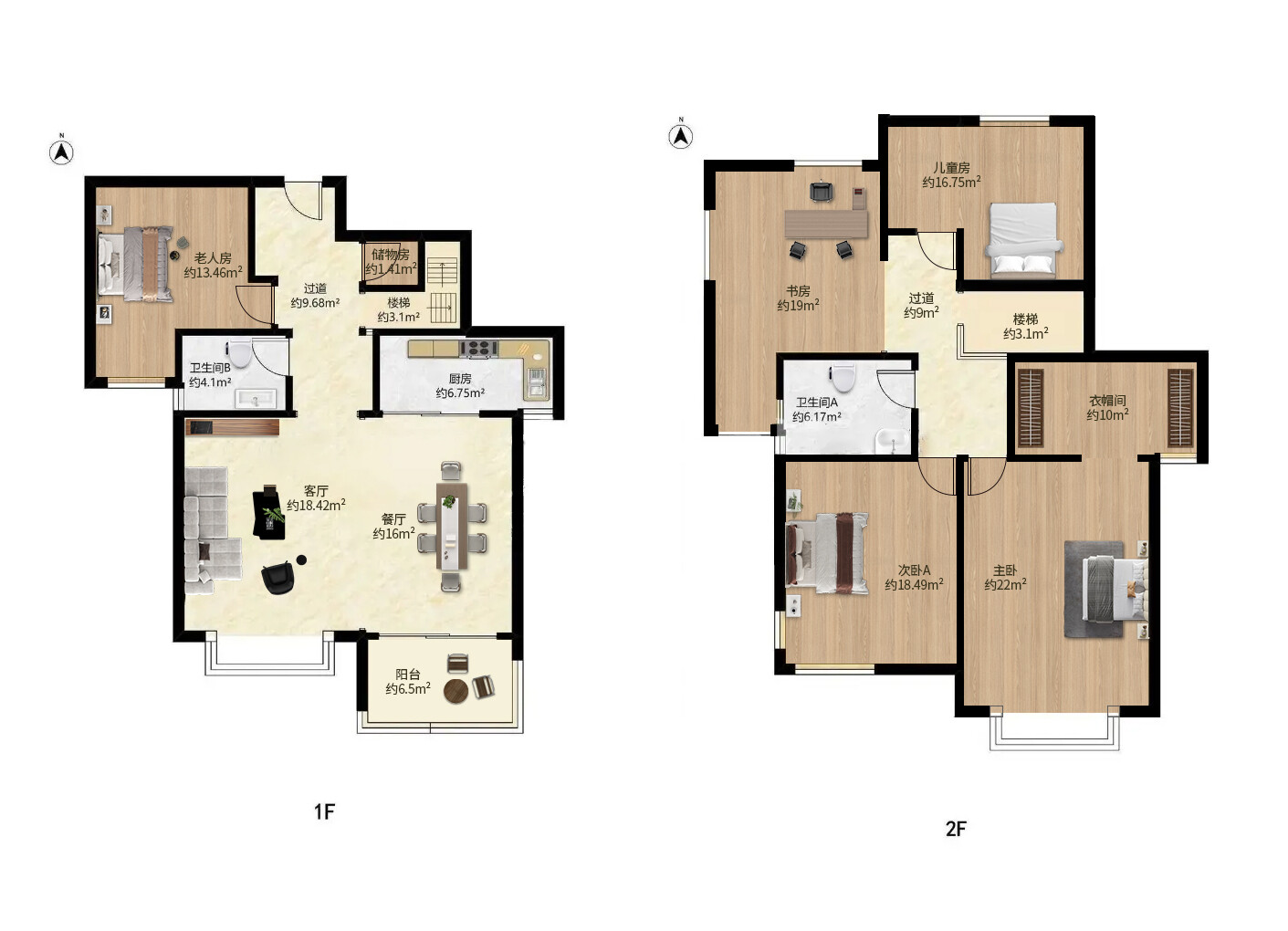
This case comes from a residential deployment. The homeowner lives in a duplex with numerous smart home devices. The existing mesh router suffered from signal degradation due to wall obstructions, slow roaming between access points, and insufficient concurrent device capacity. These issues caused Wi-Fi lag, frequent disconnections, and weak signals that failed to trigger automatic switching—disrupting remote work, entertainment, and the stable operation of smart home systems.
The client requires a whole-home Wi-Fi solution with commercial-grade stability and simple deployment and maintenance. No networking expertise should be needed for daily management, ensuring seamless coverage without dead zones, frictionless device roaming, and long-term stable connectivity for a large number of smart home devices.
Project Pain Points
Thick walls in floor plans cause significant wireless speed degradation with standard Mesh solutions when placed across walls;
Poor WiFi roaming experience during floor changes; devices stick to weak signals instead of switching to APs with better coverage.
Multiple devices like smart home gadgets, phones, tablets, and TVs are connected simultaneously. The typical home router has reached its device capacity limit, causing occasional offline status and network lag.
Ensure device 7×24 runs continuously and stably without frequent reboots. Simplify configuration management to avoid complex command-line operations.
Solution Design
Tailored to floor plan structure and user needs, we adoptAruba Instant On: Enterprise-Grade Networking for HomeNo hardware AC controller required; virtual controller enables unified multi-AP management. Configure and manage everything via the mobile app, combining enterprise-grade stability with home-user simplicity.
Hardware Configuration List:
Device Model | Usage Instructions |
|---|---|
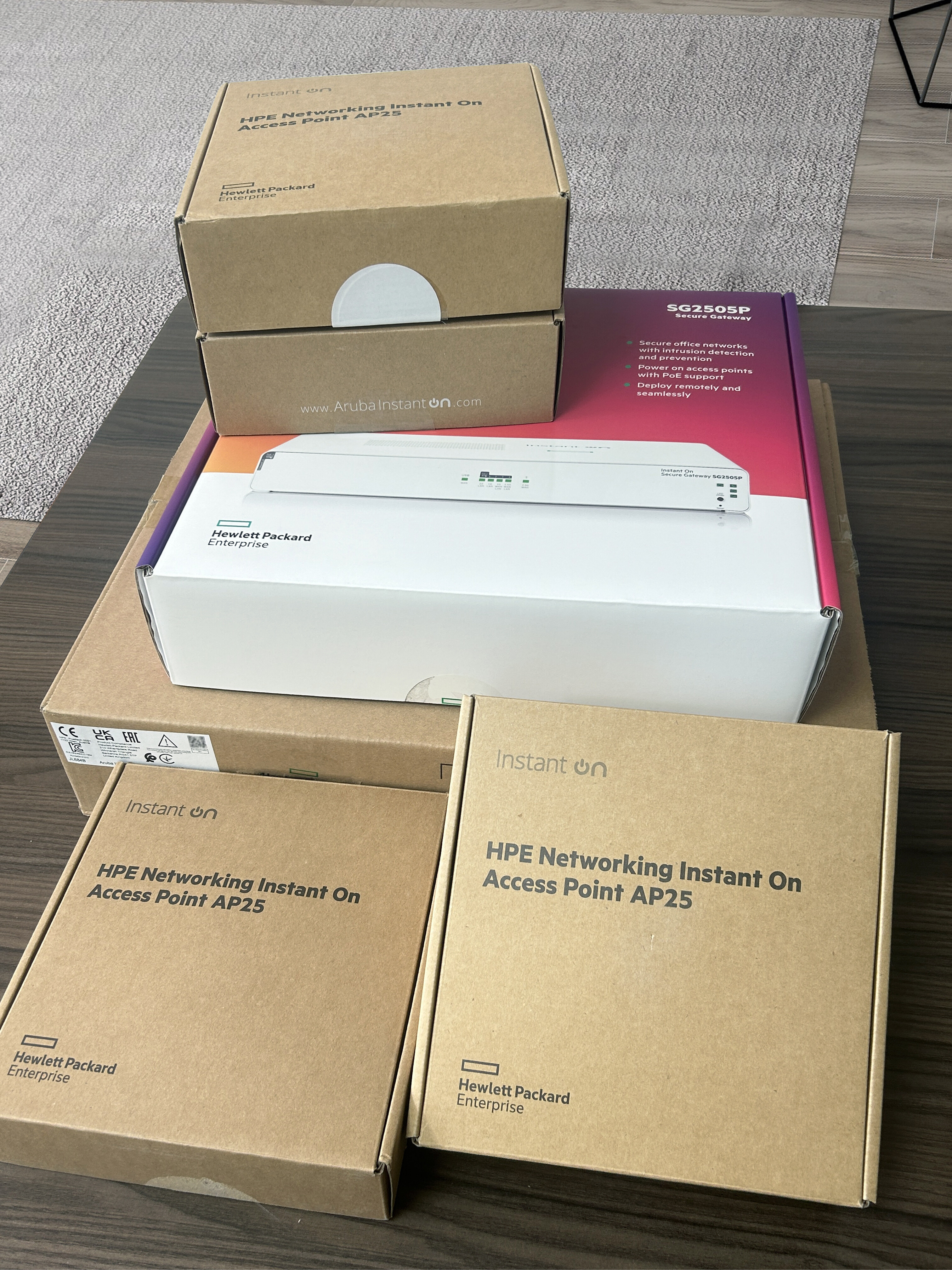
SG2505P Gateway | Replaces traditional home main routers; handles broadband dial-up, firewall policies, and overall internal network management. |
1930 Series PoE Switches (JL684B) | Provides PoE power and data forwarding for APs, eliminating the need for numerous power adapters and ensuring clean cabling. |
AP25 Multiple Ceiling-Mounted APs | Deploy across living room, bedroom, and study for seamless whole-home Wi-Fi coverage. |
Network Topology:ISP ONT (Bridge Mode) → SG2505P Gateway → PoE Switch → APs at each location
Key Implementation Points:
Switch the optical modem to bridge mode, disable its built-in routing and DHCP services to prevent speed fluctuations and latency spikes caused by double NAT.
Use Cat5e or Cat6 cables; perform continuity testing on all pre-installed cables in advance.
For optimal performance, mount the AP centrally on the ceiling to minimize signal attenuation caused by walls and furniture.
[Deployment Implementation Steps]
Configure the ISP modem to bridge mode, then connect the Ethernet cable from the modem to the WAN port of the SG2505P gateway.
Connect the gateway LAN port to a PoE switch.
Each AP connects to a PoE switch port via Ethernet cable, delivering both power and data simultaneously.
Install the Instant On app on your phone and follow the on-screen instructions to complete the initial setup. A virtual controller is automatically elected, enabling unified management of all switches and access points without requiring additional AC hardware controllers.
Key Feature Configuration
Network IsolationSeparate home and guest WiFi networks to isolate guest access, protecting the privacy and security of internal network cameras and smart home devices.
Parental Controls: Enable Parental Control to set internet access schedules for home devices.
Remote OperationsThe app supports remote access, allowing you to check the online status of intranet devices and quickly identify network issues while away.
Centralized Unified ManagementModify WiFi password or update firmware—configure once and all APs sync automatically.
Project Outcomes & Client Feedback
The entire system has operated stably and continuously for over six months, meeting all expected network performance benchmarks and resolving all of the user's previous network pain points.
Seamless Roaming ExperienceSeamlessly move between floors and rooms at home. Devices like smartphones and tablets switch effortlessly across multiple APs without disconnections or lag, delivering a roaming experience far superior to standard home Mesh routers.
Stable high-device capacitySupports massive concurrent connections from smart home devices, smartphones, and audio/video terminals with minimal dropouts or offline events. Devices operate continuously for 7×24 hours without requiring frequent restarts or resets.
Visualized O&M TroubleshootingThe app lets you instantly view which AP each terminal is connected to, making network troubleshooting simple and efficient.
Low-barrier managementNo networking expertise required. Most setup and maintenance tasks can be completed by any user via the mobile app.
Customer Reviews"Struggled with poor WiFi in a multi-level home, experiencing speed drops through walls and lag while moving. After deploying the Aruba Instant On solution, the entire home network is now rock-solid. Dozens of smart devices stay connected 24/7, and I rarely have to troubleshoot the network anymore."